Between class presentations, resumes, internship applications, student organizations and the occasional Instagram graphic you somehow volunteered to make, college students create a lot more visual content than they may realize. And while there are plenty of design platforms out there, Canva has become one of my go to resources because it makes creating something professional looking surprisingly simple.
For SMU students who already know and use Canva Free, though, there is a bigger question: Is Canva Pro actually worth paying for? Before you add another subscription to your monthly expenses, here is what you should know.
What exactly is Canva Pro?
Canva Pro is the paid version of Canva, an online design platform where you can create everything from presentations and resumes to social media posts, flyers, videos and documents.
The biggest difference between Free and Pro is access. According to Canva’s comparison of its Free and Pro plans, Pro unlocks a much larger collection of premium templates, photos, videos, graphics and audio, along with additional editing and AI powered tools.
For an SMU student, that basically means fewer moments spent staring at a blank PowerPoint slide at 11 p.m. wondering how you are supposed to make a presentation look good by your 9:30 a.m. class.
What would I actually use Canva Pro for at SMU?
Probably more than you think.
For classes, Canva can be used to create presentations, infographics, group projects, and other visual assignments. Outside the classroom, it becomes even more useful. Student organizations can create recruitment materials, event flyers and social media posts, while students preparing for internships and jobs can design resumes, portfolios, and other professional materials.
Canva even highlights projects, collaboration, extracurricular activities, and job applications in its resources for college students.
As a PR and CCPA student, I use Canva constantly between classes, internships, and student organizations. When I need to make something quickly, I would much rather start with a polished template than spend an hour figuring out how to make three text boxes line up perfectly.
How much does Canva Pro cost?
Here comes the part every college student actually cares about… the price.
Canva currently lists its individual Pro plan at $180 per year when billed annually, although pricing and plans can change. Before paying for a subscription, check Canva’s current pricing and whether you have access to premium features through your university.
College students do not automatically qualify for Canva Education, which is primarily designed for K-12 education. However, some universities participate in Canva for Campus and provide students with access to premium features.
In other words, check what you already have access to before handing over your credit card. Your bank account will appreciate it.
What am I actually getting with Pro?
Canva Free is already a useful platform, so you definitely do not need Pro to make a good presentation. The difference becomes more noticeable when you use Canva frequently.
Pro gives users access to a larger premium content library, Background Remover, Magic Resize, additional AI tools, Brand Kits and more cloud storage.
Magic Resize is one of those features that does not sound life-changing until you are making graphics for an organization. Instead of recreating the same event announcement for an Instagram post, Story and other formats, you can resize one design for multiple platforms. It is a small feature that can save a surprising amount of time.
And yes, you also stop finding the perfect template only to realize it has the tiny Pro crown on it.
Do I need to know anything about graphic design?
Not really, which is part of Canva’s appeal.
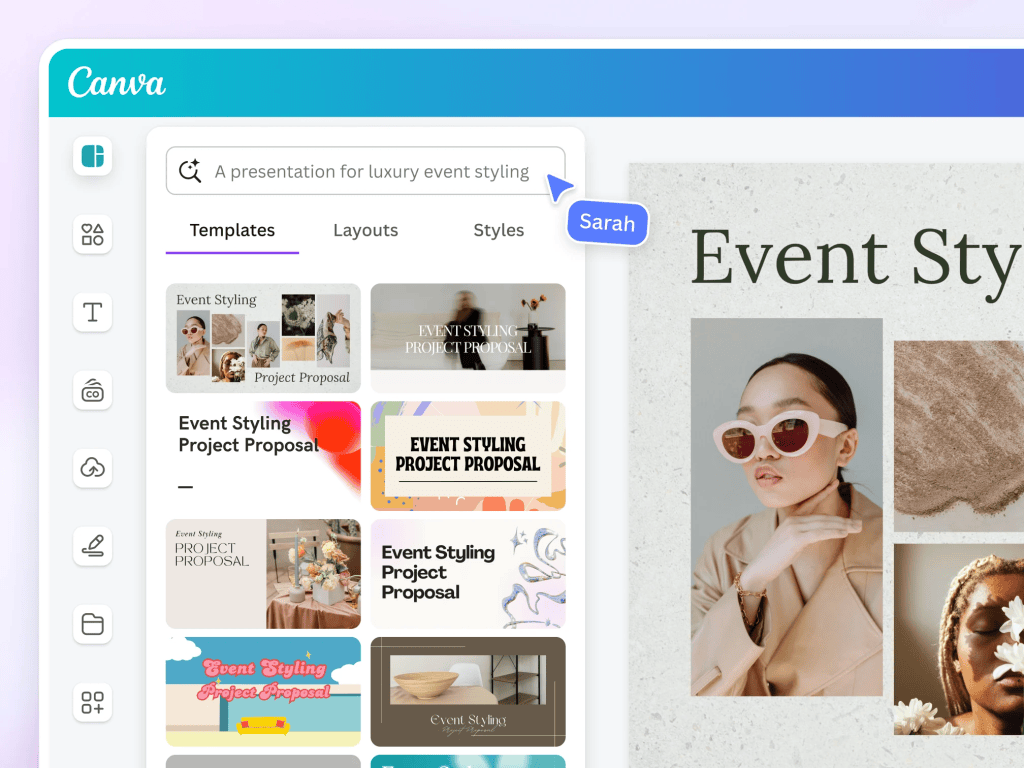
The platform uses a drag and drop editor, and its templates give you a starting point rather than an intimidating blank page. You can swap out fonts, colors, photos and layouts without needing to understand professional design software.
That being said, Canva cannot save every design decision. Just because you can use six fonts on one flyer does not mean you should. You still need to think about readability, organization and what information actually matters.
Canva simply makes the design process much more approachable for people who are not trained graphic designers.
What does an actual SMU student think?
I wanted an opinion beyond my own, so I asked Mia Miranda, a SMU honors student and President of Pi Beta Phi, about their experience using Canva Pro.
“It’s really helpful when making creative craft book type pages. I use it frequently for the background remover feature”
Their experience points to what I think is Canva Pro’s biggest benefit for college students: convenience. Between classes, internships, organizations and everything else happening during the week, saving even a little time on a project can make a difference.
So, is Canva Pro actually worth it?
My answer: it depends on how much you use it.
If you open Canva twice a semester to make a class presentation, stick with Free. You probably will not get enough value out of a paid subscription.
But if Canva is permanently open in one of your browser tabs because you are constantly making presentations, social content, resumes, event graphics or internship materials, Pro starts making much more sense. I especially think it can be valuable for students in PR, advertising, marketing, and communications because visual content is such a regular part of both school and professional work.
My advice is to start with Canva Free and see how often you use it. If you constantly find yourself clicking on premium templates, needing Pro features or using Canva several times a week, upgrading may be worth it.
After all, Canva Pro cannot make your group project members answer their texts, but it can at least make the final presentation look good.


Leave a Reply